








Product specification LOVENSE Charging Dock for Ambi
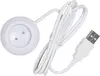
Description
The LOVENSE Charging Dock for Ambi is the official power replenishment solution designed specifically for the Ambi device by LOVENSE. This dedicated accessory ensures your device receives a reliable and steady charge for daily use, keeping it always powered and ready. Engineered for seamless desktop placement and effortless docking, it combines practical functionality with a clean design that integrates easily into your space.
Advantages
Using the official LOVENSE Charging Dock for Ambi guarantees secure and stable positioning while charging, reducing the risk of accidental slips or connection drops. The custom-engineered form factor matches the device precisely, offering a hassle-free drop-and-charge experience without the need to fumble with loose cables. It helps keep your desktop or nightstand organized while maintaining optimal battery readiness.
Suitable for
- Daily power replenishment for the LOVENSE Ambi device
- Convenient desktop or bedside storage and charging
- Keeping your device organized and always ready for use
When it may not be suitable
This charging dock is exclusively designed for the LOVENSE Ambi device and is not compatible with other models or brands. If you do not own the specific Ambi device, this accessory will not serve your needs.
Key specifications
- Designed exclusively for LOVENSE Ambi
- Official manufacturer accessory
- Desktop placement design
- Cable connection for power supply
How to use
Connect the charging dock to a compatible USB power source using the appropriate cable. Place your LOVENSE Ambi device securely onto the dock alignment slot to initiate power replenishment. Ensure the device sits properly on the charging contacts for a stable connection. Once charging is complete, simply lift the device off the dock.
What to consider before purchase
- Verify that you own the LOVENSE Ambi device
- Check available desktop space and proximity to a USB power source
For best results, keep the charging contacts clean and dry, and disconnect the dock from power when not in use for extended periods.

